You are using an unsupported browser. Please update your browser to the latest version on or before July 31, 2020.
close
You are viewing the article in preview mode. It is not live at the moment.


Northwood Tech - We're moving to Service Desk!

MyHelp is no longer being used for Northwoodtech-related technical assistance requests. Please use the new (Click) Service Desk to submit all support requests and track your tickets.

WILM Help Desk

For WILM-related ticket issues, please select the "Submit a WILM Ticket" option below.

 
Home > Computer & Software > Screen Lock-Out
Screen Lock-Out
print icon

The fix:

This must be done on the affected device specifically on the affected user profile to resolve.

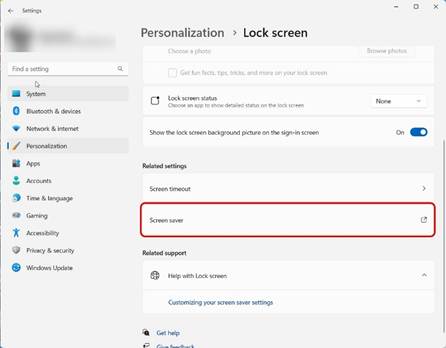
  1. Settings > Personalization > Lock Screen > Screen Saver
  2. Set (None) to anything else and set Wait to 30 minutes > Apply
  3. Set back to (None) and Wait should remain 30 minutes > Apply


Was this helpful?
3 out of 3 found this helpful

scroll to top icon