You are using an unsupported browser. Please update your browser to the latest version on or before July 31, 2020.
close
You are viewing the article in preview mode. It is not live at the moment.
Scheduled Maintenance:
The WILM Data Center staff will be performing monthly server maintenance this Sunday February 15th, 2026, from 6:00 AM – 12:00 PM.
All PeopleSoft Services will be inaccessible during this time:

MyNORTHWOODTECH Portals and Centers (Faculty, Employee, Student), Campus Solutions, Finance, HR, Perceptive Content, Cognos, WILM FTP, WILM VPN.
Blackboard is not affected by this maintenance outage
Home > Computer & Software > Staff VPN Setup
Staff VPN Setup
print icon

How to connect to NWT VPN-Staff


  1. Click on the carrot or on the icon in the right corner of the taskbar. 


Or


  1. Click on the FortiClient icon and choose Open FortiClient Console.


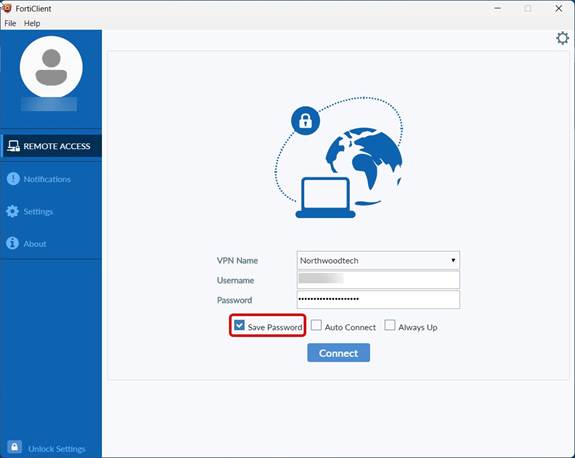
  1. Choose the Remote Access tab, enter Username and Password below, Save Password, and click Connect.


      Username: Staff ID#

      Password: MyCampus\Network password
**If your login credentials do not work, please contact the help desk.

Was this helpful?
0 out of 0 found this helpful

scroll to top icon